Is the Wobkey Rainy 75 Pro Still Good in 2026? Long-Term Review
I've been using the Wobkey Rainy 75 Pro for about seven months now, and I wanted to write a long-term review that goes beyond the initial unboxing impressions. I bought this board because I wanted a compact 75% layout with modern features: hot-swap capability, solid build, decent battery life for wireless use, and firmware flexibility. Over many work sessions, late-night typing marathons, and some light modding, I've learned what the Rainy 75 Pro does very well and where it shows its age or corners cut. Below is a frank, hands-on account of my experience.
Introduction: Why I chose the Rainy 75 Pro
In early 2025 I was looking to replace a battered TKL board with something smaller but still practical for daily productivity. The Rainy 75 Pro appealed because it promises a compact layout that retains arrow keys and a function column, a gasket-style case, and advertised support for both QMK and a vendor configuration app. It also came in a matte, understated colorway that fit my workspace. At the time, the price was competitive for a feature-rich 75%—so I took the plunge.
First impressions and setup
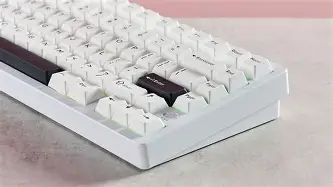
Out of the box the Rainy 75 Pro feels heavier than its size suggests, which I take as a good sign. The case is aluminum with chamfered edges and a slightly recessed top plate that gives the keycaps a nice visual depth. Installation and initial setup were straightforward: the board boots into a simple firmware mode, and the vendor app detects it for lighting and macro programming.
One of the first things I did was test hot-swap functionality. I swapped the stock tactile switches for a set of linear switches I like, and everything seated cleanly. The keycaps shipped were PBT with dye-sub legends—functional and grippy, but not the thickest PBT I've used. Overall the out-of-box experience was solid; nothing felt cheap, but there were a couple of small annoyances I'll get to below.
Design and build quality
Design-wise the Rainy 75 Pro hits a sweet spot: compact without feeling cramped. The layout preserves dedicated arrow keys and a column of keys on the right for convenient navigation shortcuts. The top plate is stainless steel, and the case is a two-piece aluminum shell with a foam layer between the PCB and the bottom case. That internal foam does a visible job of damping; the stock typing profile is pleasantly muted.
Over months of daily use the finish has held up nicely—no obvious scratches or paint chips from normal handling. The stabilizers are pre-clipped and pre-lubed at the factory, but in my unit they still had a faint rattle on larger keys (space, enter). After I relubed them with a light Krytox mix and added a small bit of dielectric grease to the wire legs, the rattle was mostly gone. This is not unusual for mechanical keyboards, but it is something an owner should expect to tinker with for optimal feel.
Typing experience: what it's like day to day
Typing on the Rainy 75 Pro is the main reason I kept it. The gasket-like mounting and the factory foam produce a soft, slightly bouncy sound that I enjoy during long work sessions. Key travel is comfortable and the plate flex is tuned to avoid harsh reverberation. After switching to my preferred linear switches, I found that the board's acoustics were flattering—they emphasized a warm thock rather than a sharp ping.
There were a few imperfections: the bottom-out feel isn't as plush as more expensive gasket boards with thicker foam and heavier brass plates. If you prefer a very firm, solid bottom-out, the Rainy 75 Pro may feel a touch springy. Conversely, if you like a softer, cushioned press, this board will likely suit you.
Switches, keycaps, and customization
The Rainy 75 Pro ships with a choice of common switch options (tactile, linear, clicky) depending on region. My unit came with a mid-range tactile switch that was pleasant enough, but I quickly swapped them because I enjoy experimenting. Hot-swap sockets are compatible with both 3-pin and 5-pin switches, which saved me from desoldering.
Find top-rated Laptops & Computers products at great prices.
Browse Now →The included keycaps are 1.5mm PBT with good legends—durable and resistant to shine. However, the profile is a medium sculpt that not everyone will love; if you prefer SA or XDA profiles you should plan to use aftermarket caps. The board supports per-key RGB and a few factory lighting presets. The underglow is subtle and tasteful—enough for personality without being distractingly bright.
Sound and recommended mods
Out of the box I liked the sound, but I also love modding. After lubing the stabilizers and adding a thin layer of Poron foam between the PCB and case, the acoustics improved noticeably: deeper thock, fewer high-frequency overtones, and a quieter bottom-out. I also swapped the factory foam for a density-specific dampening mat and noticed reduced hollow resonance.
If you don't want to mod, the stock sound is still good. But if you enjoy tailoring the sound signature, the Rainy 75 Pro responds well to common mods: lubed stabs, a thin top foam, or even a switch film for tighter switch housings.
Firmware, software, and customization
Software was a two-sided experience. The vendor's configuration app works for basic lighting and macros, and it has a simple layout that non-technical users will appreciate. What I found frustrating was that the app occasionally failed to save profiles in Windows unless the board was put into a specific mode. Fortunately, the Rainy 75 Pro also supports QMK and VIA, and once I flashed VIA-compatible firmware, programming keymaps and layers became seamless. In my experience, the best route is to switch to open firmware if you plan to customize layers or complex macros.
One nice detail: the Rainy 75 Pro has a built-in reset and supports flashing over USB-C, which made my life easier when trying different firmware builds.
Connectivity and battery life
I used the Rainy 75 Pro in both wired and wireless modes. The board supports Bluetooth 5.2 and a proprietary 2.4 GHz dongle for lower-latency wireless. In Bluetooth mode with backlight off, I routinely got around 100–120 hours of active typing time between charges with the stock 2500 mAh battery. With RGB on at moderate brightness, that number dropped to roughly 20–30 hours. Using the 2.4 GHz dongle yielded nearly identical responsiveness to wired, and I didn't experience any pairing drops in my apartment environment.
There were a couple of quirks: switching between three Bluetooth profiles is fast and reliable, but re-pairing after long sleep sometimes required re-entering the pairing code on a few older devices. Also, the vendor app exposes a "power-saving" mode that can throttle polling rate to squeeze more battery life; in my experience, this is useful for casual typing but not ideal for gaming where latency matters.
Durability and long-term wear
After seven months of daily use, the Rainy 75 Pro looks and functions nearly the same as the day I bought it. The case finish has minor scuffs on the underside where it rubs the desk—nothing cosmetic on the top. The USB-C port remains solid. I swapped keycaps several times and the PBT legends show no fading.
Shop the latest Laptops & Computers picks on Amazon.
Browse Now →One durability note: the included rubber feet are stick-on pads that are fine, but if you are rough with your gear you might want to replace them with thicker, more permanent feet. Also, if you plan to travel with the board frequently, invest in a hard case; the aluminum case is sturdy but exposed edges can catch.
Price and value (my perspective)
I paid what felt like a fair price for the Rainy 75 Pro relative to similar 75% boards on the market. It gives a lot of features for the money: hot-swap, QMK compatibility, a baked-in foam sound profile, and competent wireless support. If you value out-of-the-box perfection and zero tinkering, there are cheaper plug-and-play boards; if you value a board that responds well to modest mods and upgrades, the Rainy is good value.
Pros & Cons
- Pros
- Compact 75% layout that retains useful navigation keys
- Solid aluminum case with pleasant weight and finish
- Hot-swap sockets compatible with 3-pin and 5-pin switches
- Good out-of-box acoustics that respond well to minor mods
- Supports QMK/VIA for advanced customization
- Reliable Bluetooth 5.2 and 2.4 GHz dongle option
- Cons
- Factory stabilizers need relubing to eliminate rattle
- Vendor software can be glitchy; switching to QMK/VIA recommended
- Battery life with RGB on is mediocre compared to low-power-only boards
- Not the firmest bottom-out—may feel too springy for some users
- Rubber feet are basic and may wear with travel
Comparison: Rainy 75 Pro vs. popular alternatives
| Model | Layout | Hot-swap | Firmware | Wireless | Stock sound | My takeaway |
|---|---|---|---|---|---|---|
| Wobkey Rainy 75 Pro | 75% | Yes (3/5-pin) | QMK / VIA support | Bluetooth 5.2 + 2.4 GHz | Muted thock, good base foam | Balanced all-rounder; great for modders who value wireless |
| KBD75 v2 | 75% | Depends on build | QMK | Wired (most configs) | Clearer, more ping without foam | Classic enthusiast pick; more DIY, missing native wireless |
| Keychron Q2 | 75% | Yes (varies) | QMK (community support) | Usually wired only | Solid thock with aluminum case | Great wired option with mature ecosystem; less flexible for wireless |
Buying guide: Is the Rainy 75 Pro right for you?
Who I think should buy it
If you want a compact 75% that is both daily-driver reliable and welcoming to light modding, the Rainy 75 Pro is a smart pick. In particular, buy this board if:
- you want wireless convenience (Bluetooth + 2.4 GHz) without giving up customization;
- you appreciate a muted, thocky sound out of the box but want to push it further with simple mods;
- you value QMK/VIA support for layers and macros;
- you want hot-swap flexibility to try multiple switch types without soldering.
Who should look elsewhere
Consider other options if:
- you want a perfectly tuned out-of-the-box experience with zero tinkering—some cheaper mainstream boards achieve that;
- you prioritize maximum wireless battery life with bright RGB on—there are boards optimized for battery efficiency;
- you need an ultra-firm, solid bottom-out and heavier plate materials (brass) without gasket give.
Key considerations before you buy
- Switch compatibility: Make sure the hot-swap sockets support the switch pins you plan to use (3-pin vs 5-pin).
- Firmware comfort: If you plan on deep customization, be prepared to use QMK/VIA—vendor apps are often limited.
- Sound preference: If you like a very firm, clicky clack, this is not the board for you without big changes.
- Travel needs: If you travel a lot, get a protective case and consider swapping the sticky rubber feet for something more robust.
- Modding plan: If you intend to mod (lube, foam, films), the Rainy 75 Pro responds well. If you won't mod, judge the stock sound and stabilizers carefully.
Final verdict and conclusion
After seven months with the Wobkey Rainy 75 Pro, here's my bottom line: it's still a very good 75% board in 2026. It's not perfect, and it doesn't try to be a high-price, boutique flagship—but it hits a compelling balance of features, build quality, and customization potential. In daily use it's comfortable, attractive, and reliable. The wireless performance and hot-swap flexibility are the features I appreciate most; they free me to move between devices and try different switch sets without friction.
What I found was that a little effort—relubing stabilizers and adding basic dampening—makes a noticeable, worthwhile improvement. If you're comfortable doing minimal mods or you plan to flash QMK/VIA to tailor the layout, the Rainy 75 Pro offers a satisfying base that will age well. If you want something that is showroom-perfect from the start with zero adjustments, you may prefer a different board.
In my experience, the Rainy 75 Pro provides great value for people who care about typing feel, wireless flexibility, and the option to tweak. I still reach for it on most days, and after months of use it remains my go-to when I want a compact keyboard that feels like it belongs to me rather than a generic peripheral.